How to Fix "407 Proxy Authentication Required" in SwitchyOmega
The Problem
Are you seeing a "407 Proxy Authentication Required" error even after entering your username and password? Or does Chrome keep popping up the login dialog repeatedly?
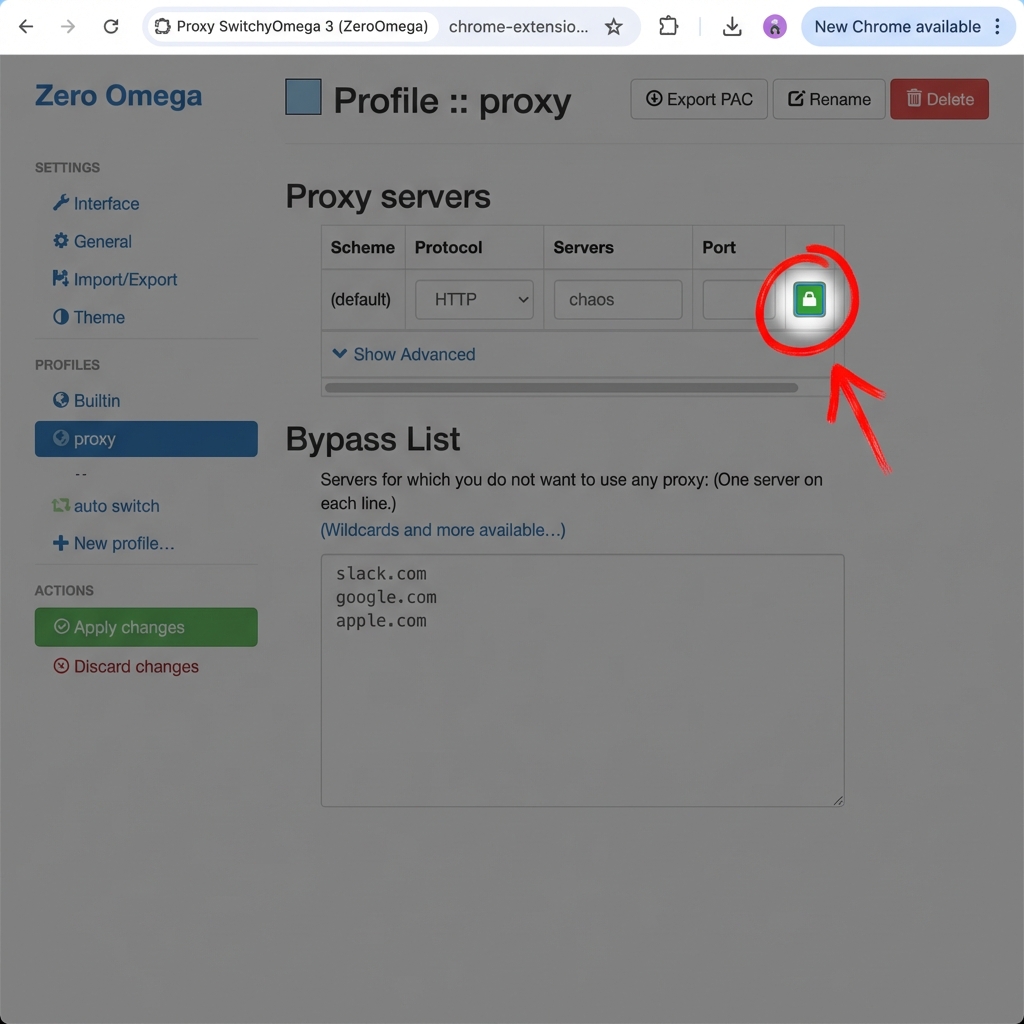
This is the most common issue with SwitchyOmega. The extension does not sync credentials from the popup automatically. You must manually configure the "Lock Icon". Here is how to fix it in 30 seconds.
In this guide, we will set up a "Chaos Profile" using Debuggo to simulate a slow network connection (3G speed) only for specific tabs.
Open your existing proxy profile (or create a new one if starting fresh).
Step 1: The Fix: Configuring the Lock Icon
Now, enter your proxy server details. If you don't have one, you can generate a free cloud proxy on Debuggo.
Settings:
Authentication (Crucial Step)
Most cloud proxies require a username and password. SwitchyOmega handles this differently:
- Click the Lock Icon 🔒 on the right side of the "Proxy auth" row.
- Enter your Username and Password.
Don't have credentials? Get them for free here (30s setup) → - Click Save Changes.
- Finally, click the big green Apply Changes button in the left sidebar.
Step 2: Fixing HTTPS Errors (CA Certificate)
⚠️ Security Warning: If you skip this, HTTPS sites like Google or your staging API will show a "Your connection is not private" error.
Since Debuggo inspects traffic to simulate errors, you must trust its Certificate Authority (CA).
- Download the Root Certificate from debuggo.app/cert.
- Install it on your system:
- macOS: Add .pem to Keychain Access -> System -> Trust.
- Windows (Crucial): Double-click .crt -> Install Certificate -> Current User -> Place all certificates in the following store -> Trusted Root Certification Authorities. (Default "Next" will NOT work).
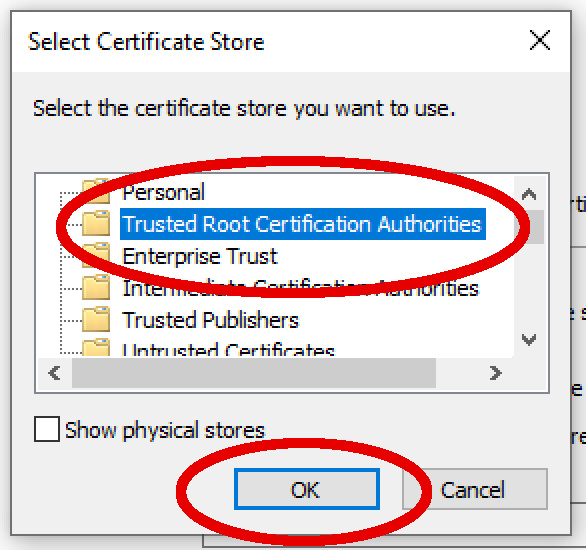
- Trust the certificate (On macOS: Right-click > Get Info > Trust > Always Trust).
Pro Tip: Use "Auto Switch" (Don't Proxy Everything)
Visual logic: Only traffic matching the wildcard rule goes through the proxy.
The best feature of SwitchyOmega is the Auto Switch mode. Instead of sending ALL your browser traffic through the proxy (which breaks Spotify and slows down Google), you can set rules.
How to set it up:
- Click Auto Switch in the sidebar.
- In the Rule List Config, allow "Wildcard" rules.
- Add a new rule:
Type: Host wildcard (Not RegExp)*.staging.your-api.com-> Debuggo Chaos. - Set "Default" (at the bottom) to Direct.
This ensures YouTube, Google, and other tabs work normally without the proxy.
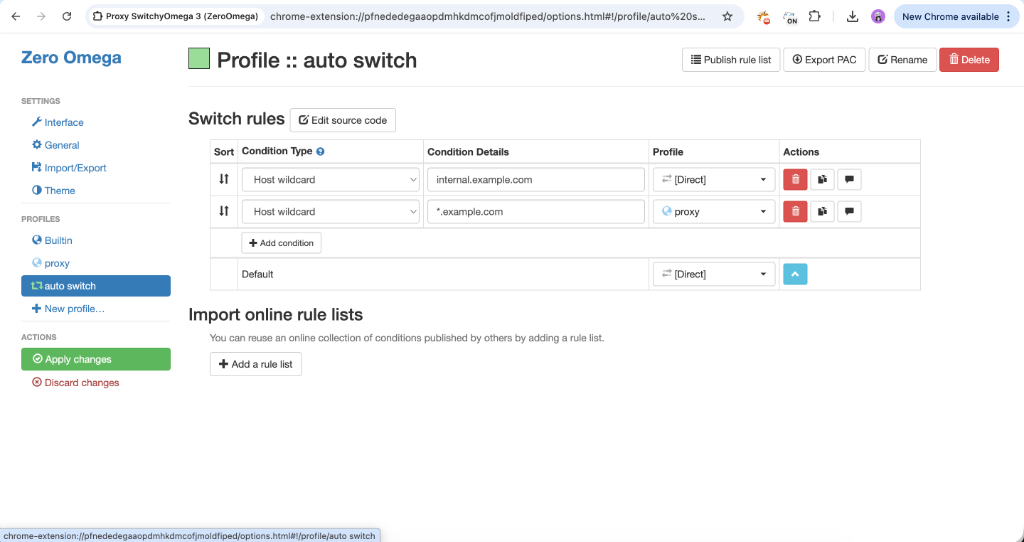
Now, simply click the extension icon and choose Auto Switch. Your browser will act normally, but requests to your staging API will be intercepted and can be throttled via Debuggo.
Step 4: Testing & Troubleshooting
Click the extension icon and select your new Debuggo Chaos profile. The icon should turn colored.
Now visit httpbin.org/ip. You should see the IP address of the proxy server, not your own.
If Chrome keeps asking for a username/password, it means SwitchyOmega didn't save the credentials correctly. Go back to the Lock Icon and re-enter them.
My localhost is not working!
Debuggo is a cloud proxy, so it cannot "see" your local computer (`localhost:3000`) by default.
If you just want your local server to work normally (without debugging it), add
localhost and 127.0.0.1 to the Bypass List in SwitchyOmega options.Use a tunnel like ngrok to expose your local server to the proxy.
ngrok http 3000 # Forwarding https://random-name.ngrok-free.app -> http://localhost:3000
Then use the ngrok-free.app URL in your browser through the proxy.
Why use this setup?
- Chaos Engineering: You can now configure Debuggo to return 500 errors or delay responses by 5 seconds, and it will only affect this browser profile.
- Isolation: Your Spotify music streaming in another window won't buffer because it's not using the proxy.
SwitchyOmega is great for browsers. But if you need to debug system-wide traffic like Fiddler Classic, check out our Cloud-Native Fiddler comparison.
Next Step: Now that you can intercept traffic, try modifying it. Learn how injecting "poisoned" data can reveal hidden bugs in your React components: Read Tip #4: Response Fuzzing.
Need a stable proxy for testing?
Get Your Proxy AddressFAQ
Q: Why is SwitchyOmega not asking for password?
A: SwitchyOmega doesn't support popup prompts well. You must click the "Lock" icon in settings to save credentials. (See detailed Auth section).
Q: Does SwitchyOmega work with HTTPS?
A: Yes, but you must install the Proxy CA Certificate to avoid privacy errors.